How to Keep Track of Restaurant Recommendations From TikTok (So They're There When You're Hungry)
You saved the taco place. Now you're standing on a corner at 7:40pm and can't find it. Here's how to keep track of restaurant recommendations from TikTok: what a usable entry needs, why save order is the wrong order, and the 30 seconds that saves you ten minutes.
It is 7:40pm on your second night in a new city and you are standing on a corner with your phone out. You know you saved a place. Something about tacos, a green awning, a woman saying it is where locals actually eat. You are scrolling a folder of two hundred saves on one bar of roaming data while the person next to you asks, reasonably, whether you have decided yet. You give up and walk into the restaurant with the English menu and the host outside.
That is the failure people mean when they ask how to keep track of restaurant recommendations from TikTok. The saving worked fine. The problem arrived months later, under conditions that make finding anything close to impossible.
A restaurant save fails at a much worse moment than a recipe save
Compare the two, because the fix follows straight from the difference.
A saved recipe fails at home. You are on the sofa, on wifi, laptop nearby, no particular deadline. If the video is vague you can rewatch it, dig through the comments, and burn ten minutes at no real cost. Annoying, recoverable.
A saved restaurant fails standing up. It is dinner time, your battery is at 12 percent, data is slow or expensive, half the group is hungry, and the place you half-remember might be twenty minutes in the wrong direction. Nobody runs a ten-minute research project in that state. You default to whatever is in front of you.
So the bar for a restaurant list is higher than the bar for a recipe list, even though it holds far less information. It has to work in about fifteen seconds, one-handed, possibly offline. A bookmarked video meets none of those conditions, because a bookmark stores a thumbnail. What you needed was the name.
A usable entry has three parts, and a thumbnail has none of them
Here is what a list of restaurants looks like when it is text. This one came out of four saved Cancún videos:
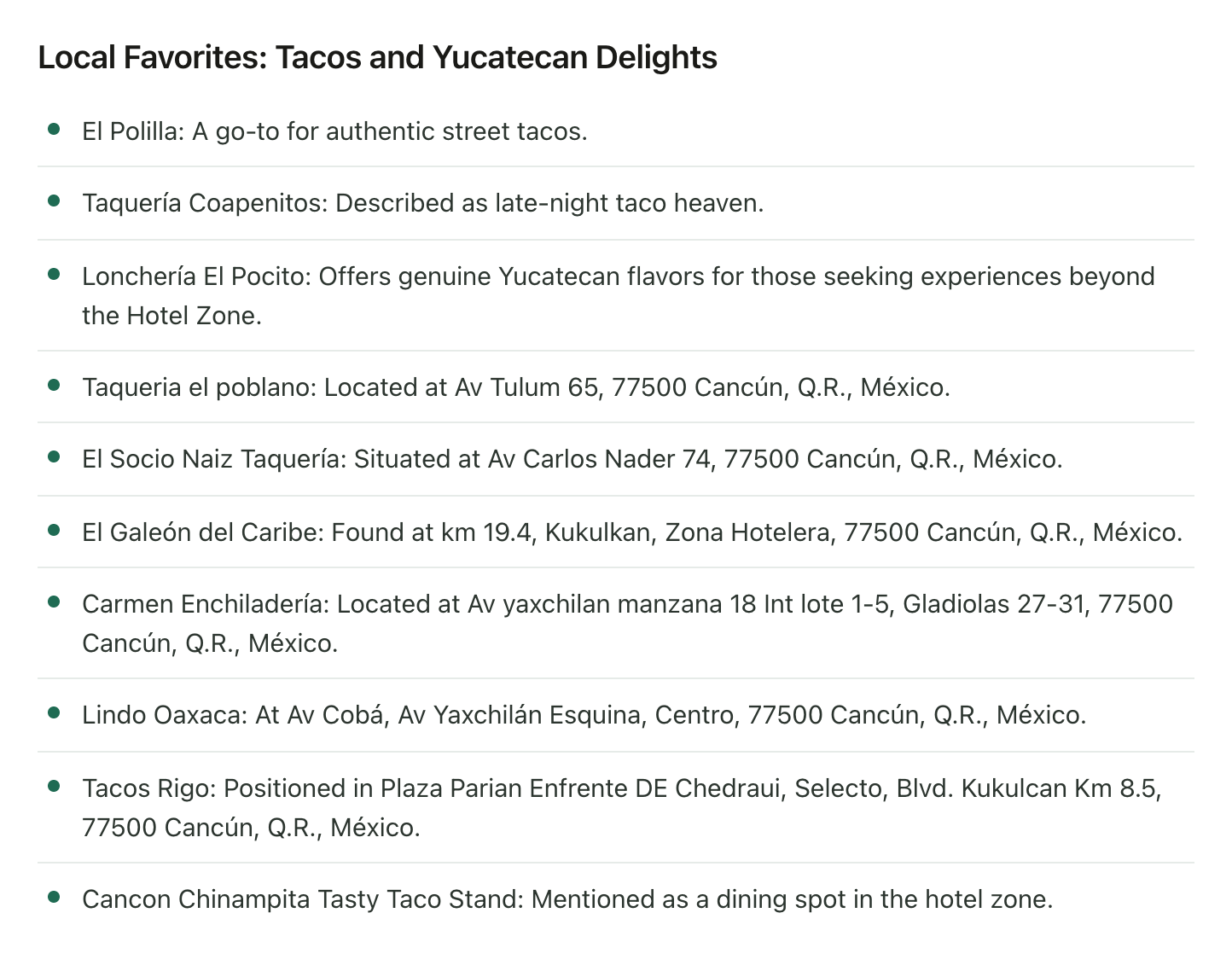
Look at what each line carries.
The name, spelled the way a map will find it. "Taquería Coapenitos" gets you there. "That late-night taco place" does not, and neither does your own approximation of a name you heard once over background music.
Where it is. Av Tulum 65. Av Carlos Nader 74. A street address is the whole difference between an entry you can navigate to and an entry you have to research before you can use it.
Why you saved it. "Described as late-night taco heaven" is worth more than it looks. Six weeks after the save you will not remember which of eleven taco places was the one for after midnight, and that single line is what lets you sort the list by what you feel like eating instead of alphabetically.
Drop any of the three and the entry quietly stops being a recommendation. It becomes a reminder that you once saw something good.
Sort by where you are standing, not by when you saved it
The other thing that breaks at dinner time is order. Saves come in save order, which is random with respect to geography, and geography is the only property you care about when you are hungry.
Same Cancún restaurants, on a map:
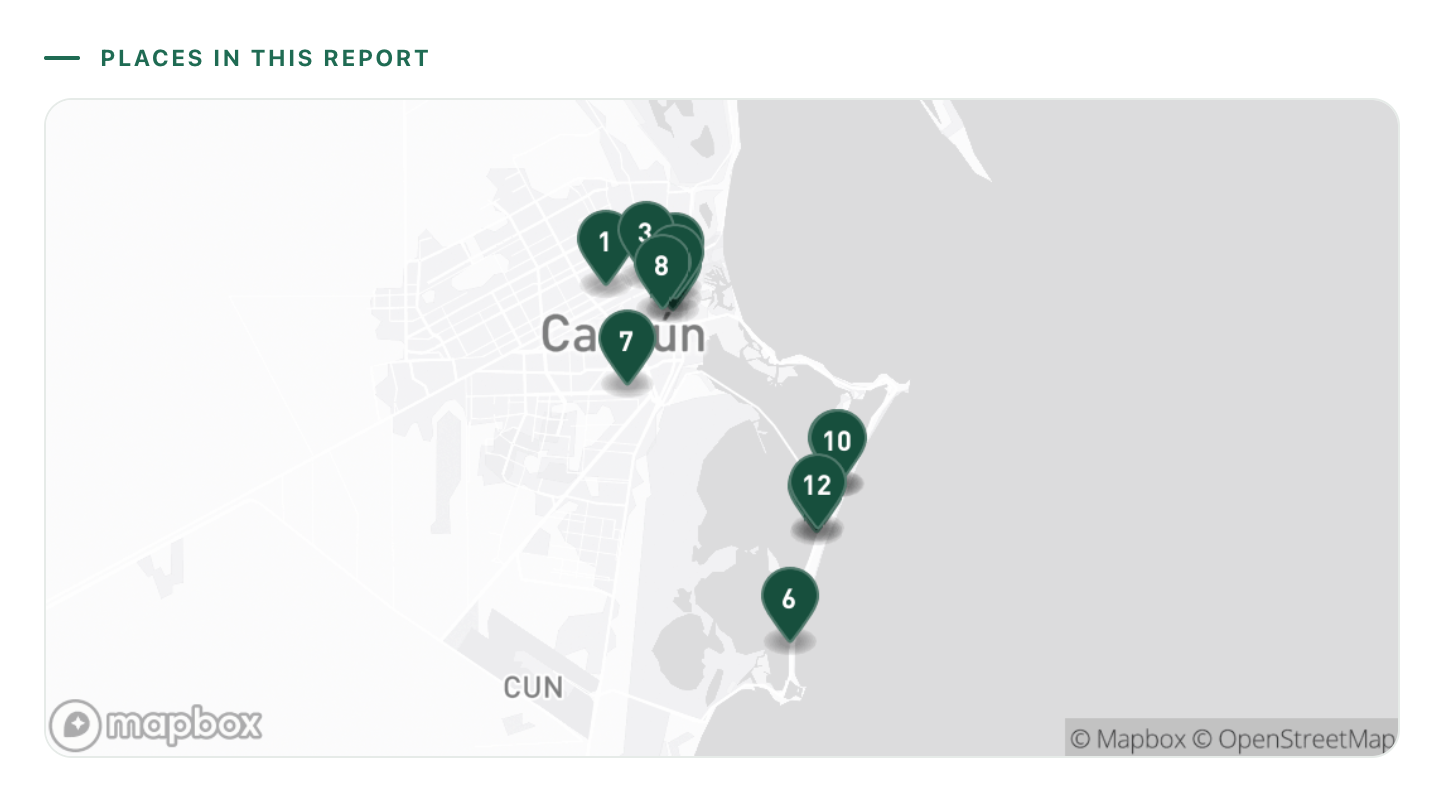
Two clusters, nowhere near each other. Most of the taquerías sit downtown around Av Tulum and Av Yaxchilán. The themed restaurants and the hotel dining string out along Boulevard Kukulcán, which is a taxi ride away, not a walk. If you are staying on the strip and your list is in save order, half of it is unusable tonight and you have no quick way of telling which half.
Once the places are pinned, that question answers itself. You are downtown, so the downtown ones are tonight's shortlist and the rest wait for an evening you have a car. This is also the point where the list wants to live in a maps app you can actually navigate with, which is its own small job: how to save TikTok places to Google Maps covers that part.
The cheapest moment to record a place is the moment you save it
There is a manual version of all this and it genuinely works. The trick is doing it at save time rather than trip time, because at save time you still have the video open and the context in your head.
So: when you save a restaurant video, before you scroll on, read the name off the screen or the caption, search it in your maps app, drop it in a list named after the city, and type one short line about why. Thirty seconds. You never open that video again.
At trip time the same work runs closer to ten minutes a video, because now you have to find the video first. That is the entire economics of this problem. The work is not hard. It just gets roughly fifteen times more expensive if you postpone it, and postponing it is the default.
The catch is that thirty seconds times every restaurant video you save is a habit, and habits break. If yours already broke and there are two hundred saves sitting behind you, the manual route means an evening of catch-up you are never going to spend. The full extraction routine is written out here, including an honest account of how long it takes per video.
How to keep track of restaurant recommendations from TikTok without the save-time habit
That is the part LilyBoard takes off you. Instead of bookmarking the video, share it in a DM to @lilyboardco, from TikTok or Instagram. A few minutes later it is in your dashboard, and when you send the word generate it comes back as an insight: every restaurant the video named, spoken or on screen, with the address when the video gave one and a line on why it was worth saving.
The Cancún list above came from exactly four saved Reels. Between them they named around twenty restaurants, and those came back grouped: local taquerías and Yucatecan spots in one section, themed places in another, hotel zone dining in a third, plus the map with the pins already dropped. Nobody rewatched anything. And because everything you send lands in one archive, saves accumulate by city instead of scattering across eight months of scrolling, which is the one thing a saved folder never does for you.
Two honest boundaries. LilyBoard reads the videos you send it, not all of TikTok, so it will not go and find restaurants in a city for you. It turns the ones you already chose into a list you can read. And it does the extraction, not the legwork: opening hours, and whether a taquería someone filmed last year is still there in March, are still yours to check.
Try it on the city you are going to next
Pick the trip that is actually on the calendar, send it the food videos you saved for that city, and then send the word generate. Ten of them fits inside the free tier at 10 videos a month, no card. By tomorrow you will have names, addresses, and the one-line reason each place caught you, in a form you can read on a street corner at 7:40pm with one bar of signal.
That is what keeping track is for. Not the collection. The fifteen seconds where you already know where you are eating. If food is most of why you travel, the food lovers guide covers the rest of the setup, and the travel side picks up once a list of places starts turning into a trip.
Try it on your own saved videos
Free for 10 videos/month. No card required. Send any Reel or TikTok to @lilyboardco and get a summary, transcript, and category in minutes.
Start for free