How to Save TikTok Recipes to Apple Notes (So the Note Still Works Without the Video)
Most TikTok recipes in Apple Notes are a bare link. Here's how to save TikTok recipes to Apple Notes as notes you can actually cook from: the amounts as a checklist, the steps under a heading, and tags that find them again.
There's a note on your iPhone called Recipes. It's a column of TikTok links, a few with a word beside them ("pasta!!", "the cucumber one"), and one ingredient list you started typing in March and abandoned after the garlic. Every time you open it, you tap a link just to find out what it was. If you're working out how to save TikTok recipes to Apple Notes, start with that note, because it's what you get when the link is the only thing you save.
The link is the easiest part to save and the least useful part to have. You can't check it off in the grocery store, search it for an ingredient, or cook from it without rewinding a video with your knuckle. If the creator deletes the video or makes it private, it points at nothing. A note worth keeping holds the recipe itself, as text, with the link underneath as the receipt.
How to save TikTok recipes to Apple Notes, one line at a time
One recipe per note, built the same way every time, so every note reads the same when you're standing at the stove. Tap the New Note button and work down.
Line one: the name you'll search for
The first line of a note becomes its title, and it's what you see in the notes list and in search. So name the dish the way you'll go looking for it in six months, plus whatever made you save it. "Crispy rice salad, cold rice, lime" turns up whether you search for the dish, the trick or the ingredient. "TikTok recipe" turns up next to forty others.
Line two: the link and the creator
In TikTok, tap Share, then Copy link, and paste it under the title with the creator's handle beside it. The link is for rewatching the one move that's easier to see than read, like how thin to slice the onions. The handle is the backup. If the video comes down, their profile is where to look for a remake or a part 2.
The ingredients, as a checklist
This is what the note is for. Put each ingredient on its own line with its amount, written the way the creator gave it: "1 stick (½ cup) unsalted butter," not "butter." If they never said how much, write "amount not given," so future you doesn't read it as a slip. Then select the lines and tap the Checklist button. Now the note doubles as a shopping list: check off what's already in the pantry and buy the rest.
Getting the amounts is the slow bit. Check the caption first (tap more to open it), then the comments, where the creator may have pinned the recipe. If the amounts are typed on screen, take a screenshot, open it in Photos, tap the Live Text button (a small frame with lines of text in it), then touch and hold the words to copy them. If they're only said out loud, turn captions on (tap Share, then Captions) and slow the video down from the press-and-hold menu. Every other place an amount can hide is in how to copy ingredients from a TikTok recipe.
Paste them in as text, not as the screenshot. Text is what you can check off and search.
The method, under a heading you can fold away
Type "Ingredients" above the list and "Method" above the steps. Select each word, tap the Format button (Aa), then Heading. Notes can collapse everything under a heading, so once you've shopped, fold the ingredients away and give the steps the whole screen.
Number the steps, and keep every time and temperature in the sentence it belongs to. "Bake covered at 350°F for 30 minutes, then 15 uncovered" is what you need when the timer goes off. "Bake until done" is what the video felt like it said.
The asides, before they're gone
Every good recipe video has a line that isn't in any list. "Let the pan get properly hot before the chicken goes in." "Pull it off the heat before it looks done." It's often the reason you saved the video, and it's the first thing you forget. Give the asides a line at the bottom, or tuck each one into the step it belongs to.
A tag or two at the end
Type # and a word, then a space: #weeknight, #airfryer, #thanksgiving. The tag turns yellow once it's active. Tags are one word, so use a dash: #sheet-pan.
Tags work across folders. Under Tags at the bottom of your folders list, tap #weeknight to see every weeknight recipe, then tap #fish until it's crossed out, and what's left is every weeknight recipe that isn't fish.
Give the recipes a shelf of their own
In the folders list, tap the New Folder button and call it Recipes. Three small things make it feel more like a cookbook:
- Pin the regulars. Touch and hold a note, then tap Pin Note, and the dishes you make every week stay at the top.
- Switch to gallery. Tap the Folder Actions button above the notes list, then View as Gallery, and each note shows as a thumbnail instead of a line of text. A screenshot of the finished dish near the top of each note makes the grid easy to scan.
- Share the folder with whoever you cook with. Open the folder and tap the Share button to invite them. Everyone sees changes as they happen, so a recipe either of you adds shows up on both phones. They'll need to be signed in to an Apple Account with Notes turned on in iCloud.
Why most Recipes notes end up as links
Line two takes five seconds. The checklist takes as long as the creator makes it. A three-ingredient pasta is a minute of typing. Eighteen ingredients said out loud over a minute of video means pausing every few seconds, then going back for the ones you missed. So most Recipes notes look like the one at the top: the first three are lovely, and everything after them is a link.
That middle step is what LilyBoard is for. You share the TikTok to @lilyboardco in a TikTok message, and it lands in your dashboard with the description and what the creator said, taken from the captions TikTok made for it. When a few recipes are in, send the word generate, or select them on your videos page and use the button. One insight comes back, by email and in the app, with each recipe written out: the ingredients with the amounts the creators gave, then the method, and the original videos linked. From there, each recipe is one copy and paste away from its own note.
Here's one recipe from one of ours. It's from six saved Thanksgiving Reels rather than TikToks, and a batch of TikToks comes back in the same format. This is the stuffing:
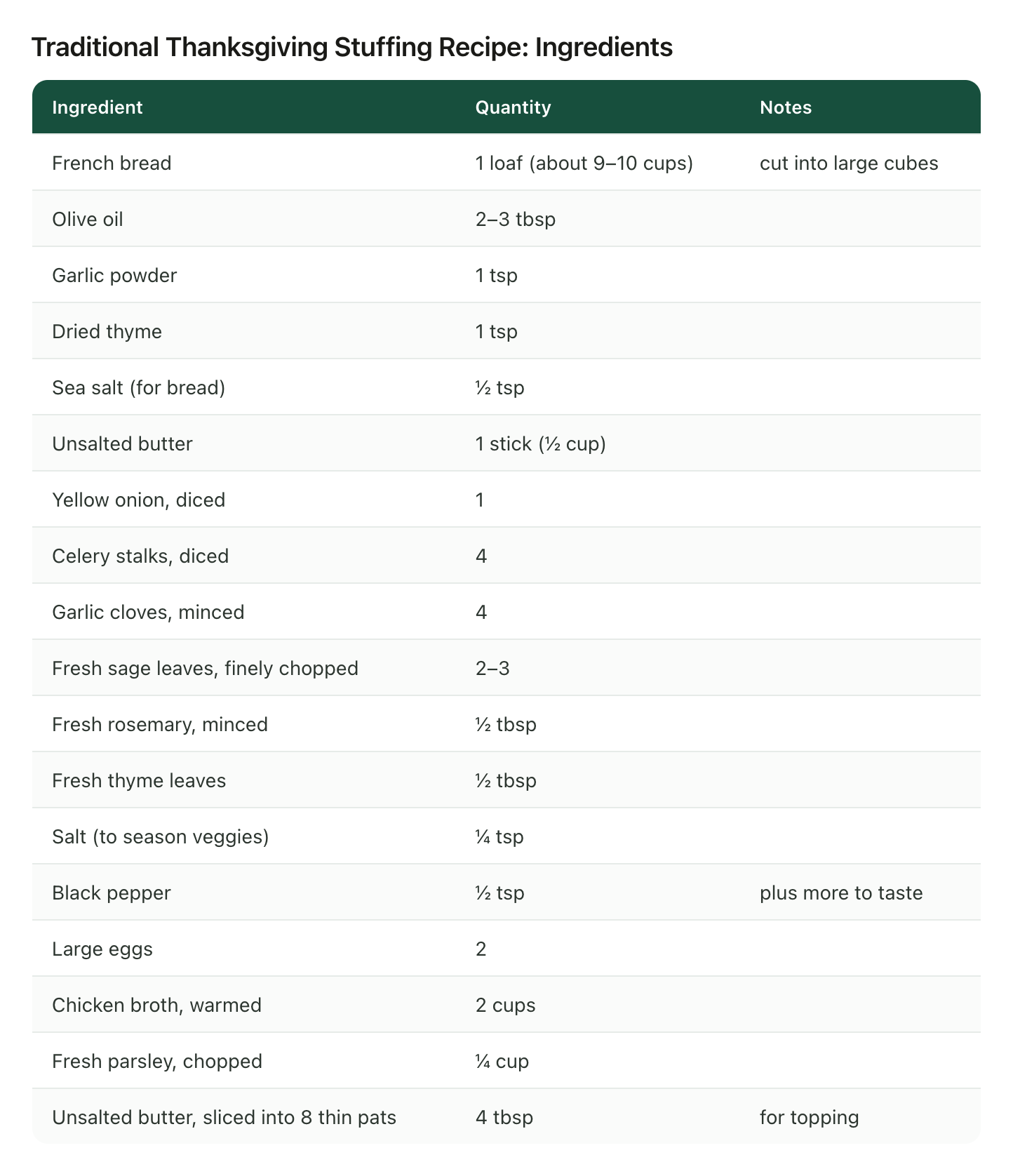
Eighteen ingredients, and every one came back with an amount, down to the 4 tbsp of butter sliced into eight pats for the top. That's the checklist, already typed. The method came back the same way, with the times and temperatures still inside the sentences:
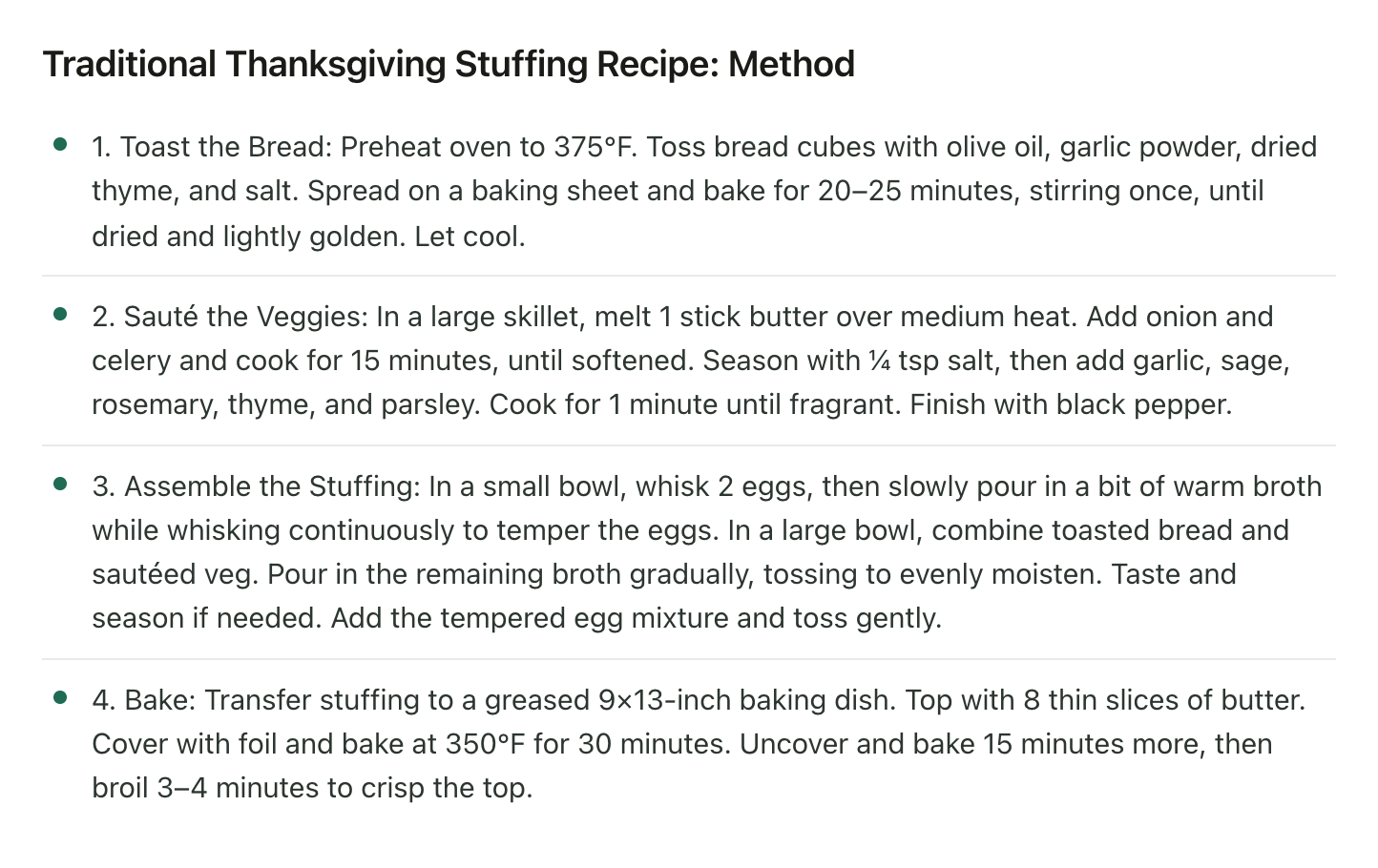
Paste that under a Method heading and the note is done. The pausing happened before you opened Notes.
Setting it up takes a couple of minutes. Sign up and add the TikTok username you'll be sending from, then follow @lilyboardco on TikTok so you can message it. On any recipe, tap Share and send the video itself to @lilyboardco, since a pasted link doesn't get picked up. Nothing comes back in the chat. The video turns up in your dashboard.
What it won't do
It won't write to Apple Notes. There's no export, so the copy and paste is still yours. It only knows the TikToks you send it. On the free plan it works from what was said, using TikTok's captions, plus the description, so a TikTok that TikTok never captioned has only its description to go on, and amounts that only appear as text on screen take Standard or Pro to read. A word TikTok misheard stays misheard, which is why every insight links back to the original videos, and one more reason to keep the link on line two.
Start with the note you already have
Open that Recipes note. Pick the three links you'd actually cook this month, open each one in TikTok, share it to @lilyboardco, then send generate. The free tier covers 10 videos a month, no card. Make the Recipes folder while the insight is on its way, and when it lands, each recipe gets its own note and the column of links can finally go.
The food lovers guide shows what the whole setup looks like once it's running.
Try it on your own saved videos
Free for 10 videos/month. No card required. Send any Reel or TikTok to @lilyboardco and get a summary, transcript, and category in minutes.
Start for free