How to Save Tutorials From Instagram and TikTok (So You Actually Learn the Skill, Not Just Hoard the Video)
You've saved 300 tutorials and learned approximately none of them. Here's how to save tutorials from Instagram and TikTok into a searchable skill library with the steps pulled out as text.
You see a 40-second tutorial that finally explains the thing: the Excel formula, the guitar transition, the resume bullet structure, the crochet stitch you keep messing up. You save it. You feel like you've learned it. You haven't. You've filed it.
Three months later you need that exact Excel formula. You know you saved a video about it. You scroll your saved folder past 300 other tutorials, can't find it, and watch a worse one from search instead. The saving felt like progress. It wasn't, because a saved tutorial you can't find again and can't read the steps from is just a video you watched once.
This post is about how to save tutorials from Instagram and TikTok in a way that actually turns into skills, not a hoard. What works, what doesn't, and a setup that takes about 3 minutes.
Why saving a tutorial isn't the same as learning it
Saving feels productive, which is exactly the trap. Three reasons the saved folder doesn't make you better at anything:
- The steps are locked in the video. A tutorial's value is the sequence: do this, then this, then this. In your saved folder that sequence only exists if you re-watch the whole video and pause at each step. You can't skim it, can't copy the formula, can't glance at step 4 while your hands are busy.
- No search by what's actually taught. You can't type "VLOOKUP across sheets" or "barre chord transition" and find the video. Saves are sorted by when you tapped bookmark, not by the skill inside them.
- Everything's in one pile. Cooking technique, Photoshop shortcut, deadlift form, language tip, all in the same chronological scroll. Even with Collections you're manually filing each one, which is the chore you opened the app to avoid.
Learning a skill takes spaced repetition and quick reference. The saved folder offers neither. It's built to re-show you a video you liked, not to help you practice something three weeks later.
What a real tutorial library needs
Three things, in order of how much they matter:
- The steps as text. The spoken instructions and the on-screen text (the actual formula, the measurements, the keyboard shortcut) pulled out so you can read and reference them without scrubbing a timeline.
- Search by skill, then categories that match how you'll use them. "Spreadsheets," "guitar," "strength training," "job hunting," not one undifferentiated stream.
- The original link kept attached. Text is great for reference, but for anything physical (a stitch, a form check, a transition) you still want to be one tap from re-watching the creator do it.
Any system with all three works. Most give you one and you drift back to the saved folder.
Three ways people try to save tutorials
1. The built-in saved folder / Collections
Free, zero setup, and it's where most people stop. TikTok and Instagram both let you group saves into named Collections.
The catch: Collections add a folder name and nothing else. No steps as text, no search inside the video, and you still hand-file every single one. You end up with a "Tutorials" folder containing 200 videos and the same "it's in here somewhere" problem.
Verdict: fine under ~50 saves, collapses past that.
2. Typing notes by hand (Notion, Obsidian, a doc)
The diligent approach: watch the tutorial, type out the steps, paste the link, tag it. This genuinely works, because now the steps are text and searchable.
The problem is it's real work per video. Transcribing a 5-step tutorial accurately means pausing, rewinding, copying the formula character by character. People keep this up for about a week. Then the notes app becomes a second graveyard with better search.
Verdict: the best result if you sustain it, which almost nobody does.
3. A tool that transcribes and categorizes it for you
Skip the manual step. LilyBoard does this: share any tutorial to @lilyboardco on the app you found it on, Instagram or TikTok, and within a few minutes it lands in your dashboard with:
- A full transcript of the spoken instructions
- The on-screen text (formulas, settings, measurements, shortcuts)
- An auto-assigned category based on what the video actually teaches
- A searchable archive you can come back to months later
You don't scrub, you don't type, you don't tag. You DM the video and keep going.
Verdict: lowest-friction option, scales past where manual systems break.
A 3-minute setup
End to end:
- Make sure you're following @lilyboardco on the app you save from, Instagram or TikTok, so DMs go through cleanly.
- Sign up at lilyboard.com and add your Instagram or TikTok username. Free tier covers 10 videos a month, no card.
- Next time you see a tutorial worth keeping, tap Share and send it to
@lilyboardcoon the same app: a Reel on Instagram, a TikTok on TikTok. Send the video itself, since a copied link doesn't get picked up. - A few minutes later the tutorial is in your dashboard with the steps as text and a category attached.
Every save after that is 5 seconds. The first time you pull up "the resume bullet formula" in one search instead of scrolling for ten minutes, the system has paid for itself.
What this looks like in practice
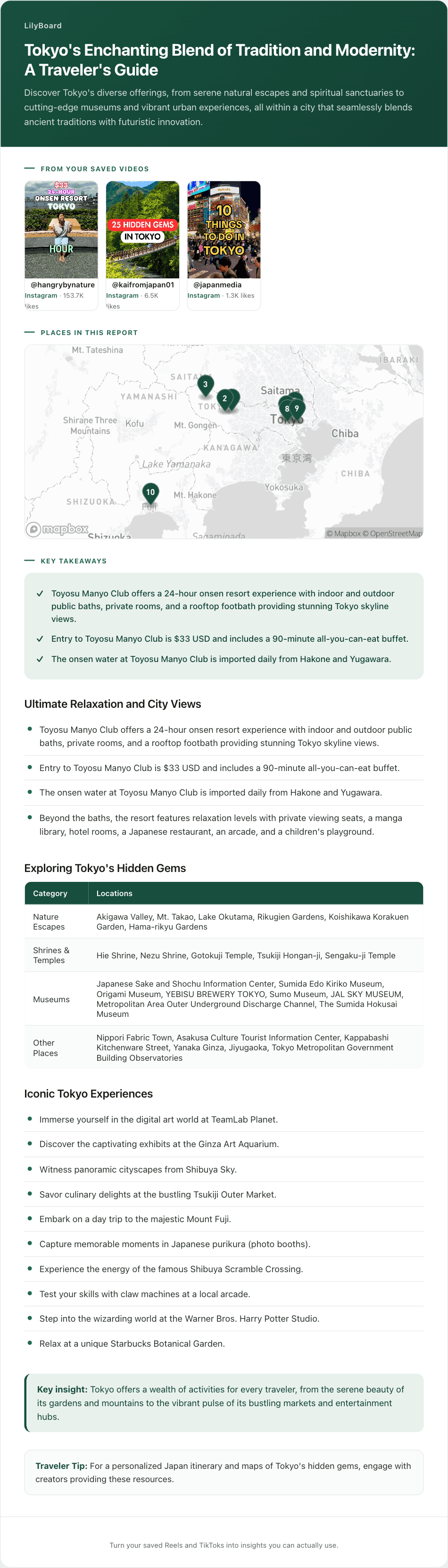
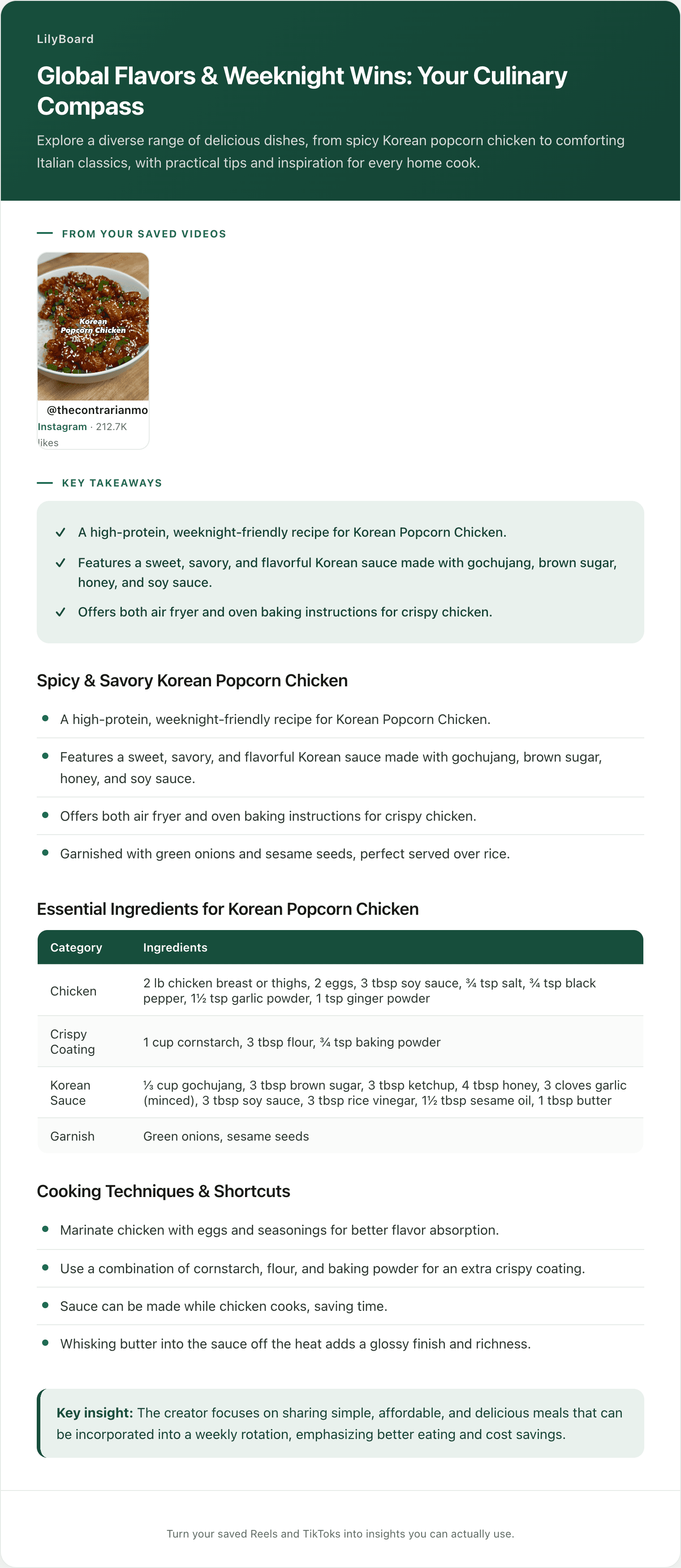
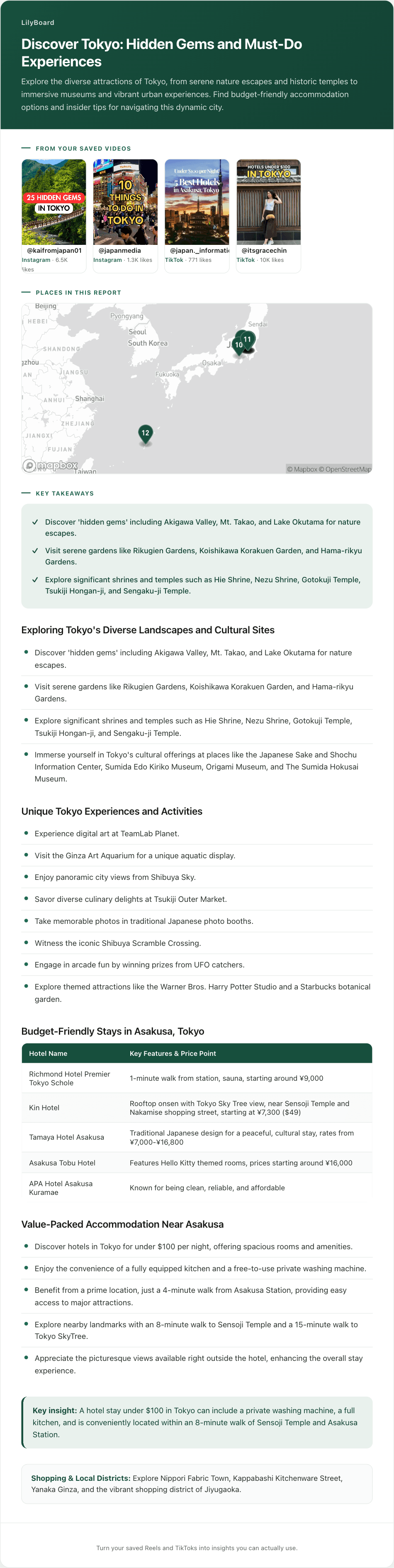
Take a creator walking through a recipe at speed, rattling off ingredients while the measurements flash on screen. Saved raw, that's a video you'd have to re-watch and screenshot to actually cook from.
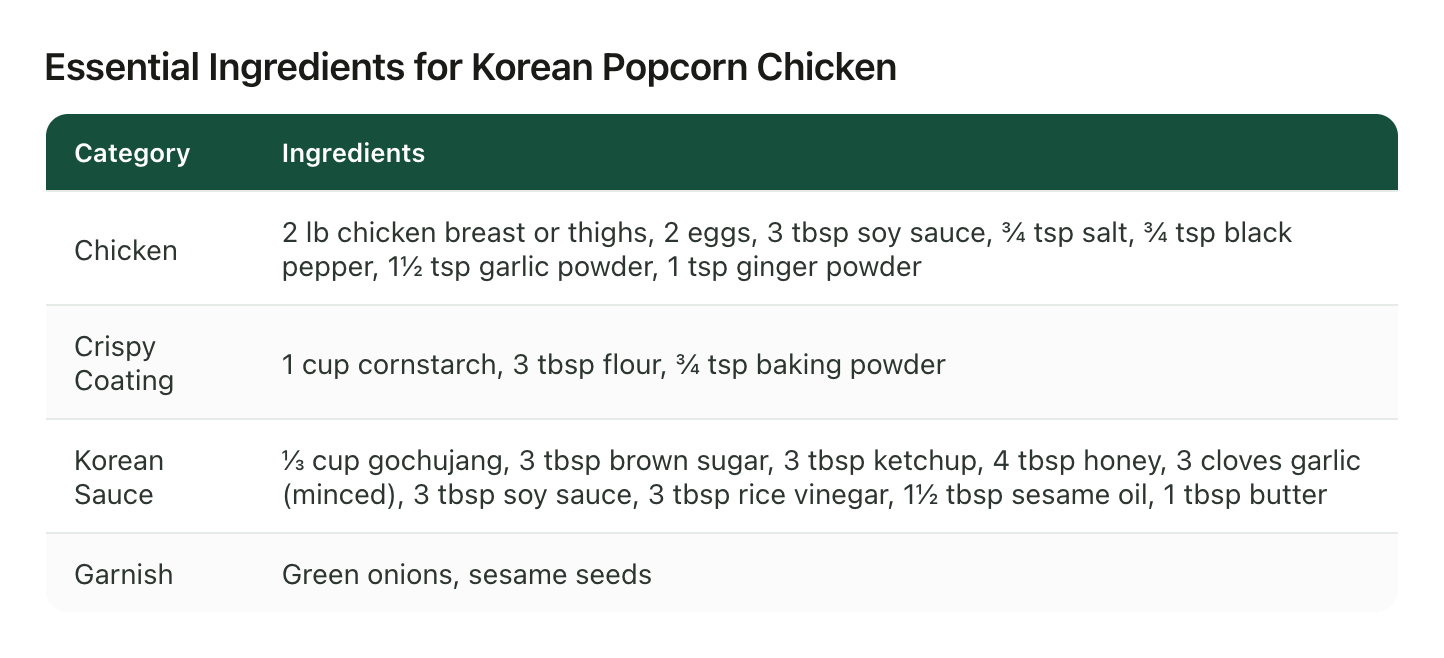
Pulled into text, it's a recipe you can follow: every ingredient with its quantity, the coating and sauce broken out, and the method step by step, ready to cook from tonight. Same idea applies to any how-to: the difference between "I saved something about this" and "here are the exact steps, in order, that I can follow right now."
A few tips once you start
- Categorize by skill, not topic. "Excel" is too broad. "Excel: lookups & references," "Excel: pivot tables" gives you real recall. LilyBoard auto-categorizes broadly, so make a collection for each of those and name it that.
- Save to do, not to feel productive. Before you save, ask: am I going to practice this, or did I just enjoy watching someone be good at it? The second one goes in Likes.
- Review weekly, not someday. Open your library, pick one tutorial, actually do the thing. A skill library you never reference is the saved folder with extra steps.
- Keep the source. For anything physical, the text is your reference and the original video is your form check. Keep both.
TL;DR
Saving a tutorial isn't learning it. The saved folder hides the steps inside the video, can't search by skill, and dumps everything in one pile, so saved tutorials never turn into skills.
Collections add a folder name and nothing else. Typing notes by hand works if you can sustain it, which almost nobody can. The lowest-friction option is to forward each tutorial to a tool that transcribes and categorizes it for you. Try LilyBoard free (10 videos/month, no card). DM any Reel or TikTok to @lilyboardco on Instagram or TikTok and get the steps as searchable text in minutes.
Your saved tutorials stop being a hoard and start being a library you actually learn from.
Try it on your own saved videos
Free for 10 videos/month. No card required. Send any Reel or TikTok to @lilyboardco and get a summary, transcript, and category in minutes.
Start for free