
Turn Tutorial TikToks into Notes You Keep
Send any how-to video, DIY tutorial, or educational Reel to @lilyboardco and get back a structured summary with steps, tools, and key takeaways. Reference them anytime.
What You'll Discover
Extract valuable learning insights from trending videos and turn them into structured knowledge.
Educational Content
Extract key concepts, explanations, and learning points from educational videos and tutorials.
How-To Guides
Convert step-by-step tutorials into written guides you can reference anytime.
Skill Development
Learn new skills and techniques by extracting structured information from expert content.
Research & Analysis
Gather insights and data from informational videos for your research projects.
Who This Is For
LilyBoard is built for people who learn from short-form video and want to actually keep what they learn. If these sound familiar, you'll get a lot out of it:
- You save how-to TikToks but can never find the one you need when you need it.
- You watch BookTok and want a running list of recommendations with one-line summaries.
- You take notes from tutorial Reels but end up with screenshots you can't search.
- You're learning a skill from creators and want a growing library of steps and tips.
- You want to reference tutorials without scrubbing through a 60-second video every time.
A Real Insight
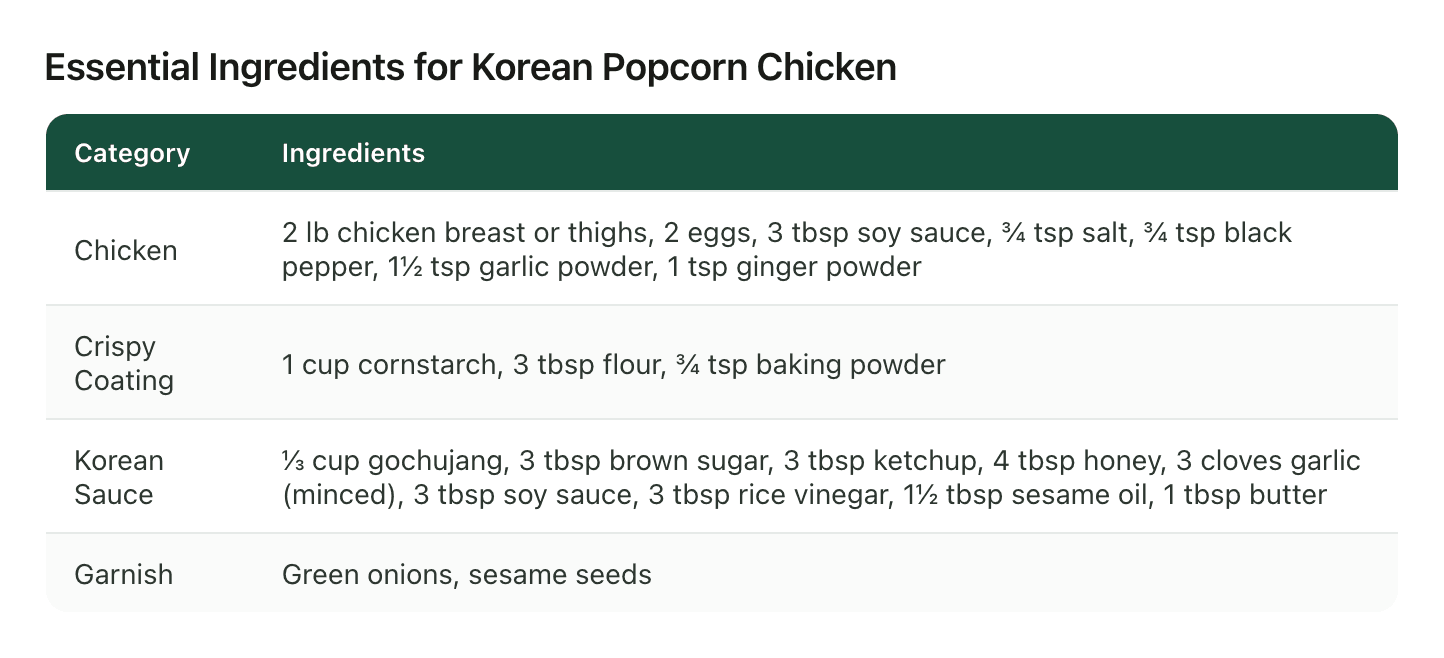
A saved recipe tutorial turned into structured notes: every ingredient with quantities and the method pulled out as text, ready to follow. The same works for any how-to.
How Learners Use LilyBoard
Here are some ways curious learners use LilyBoard to enhance their knowledge.
Tutorial Breakdowns
Extract step-by-step instructions from DIY and tutorial videos.
Educational Summaries
Get key concepts and explanations from educational content.
Skill Learning
Convert skill-building videos into structured learning materials.
Learners FAQ
Can LilyBoard turn a tutorial TikTok into a written guide?
Yes. Send the tutorial link to @lilyboardco and you'll get back a structured step-by-step guide with tools, materials, and any tips the creator mentioned, in plain text you can search and reference.
Does it work on longer educational videos too?
It's optimized for short-form content, but it handles videos up to several minutes. If the video is an explainer or how-to, LilyBoard pulls out the key concepts and steps.
Can I build a library of tutorials I've saved over time?
Yes. Every tutorial you send gets saved to your LilyBoard library, where you can search across all of them by topic, step, or tool.
Does it capture on-screen text, like diagrams or code?
It captures on-screen text, labels, and written elements in the video. Diagrams get described in the output; code snippets come through as text.
Is there a way to share a tutorial guide with a friend?
Yes. Each guide is shareable as a link. Good for study groups or sending a tutorial to someone learning the same skill.
Ready to Discover Amazing Things?
Send. Summarize. Uncover the best travel spots, recipes, and life tips from viral videos — instantly.