The Best Way to Organize Saved TikToks (So You Can Actually Find Them Again)
Your saved folder has 800 TikToks and you can't find any of them. Here's the best way to organize saved TikToks into a searchable, categorized library you'll actually use.
You hit save on a TikTok because it's exactly the cleaning hack, book rec, outfit idea, or workout you've been looking for. You tell yourself you'll come back to it. A month later your saved folder has 800 videos in it, and when you actually need that one cleaning hack, you scroll for 10 minutes, give up, and Google it instead.
The saved folder doesn't fail because you're disorganized. It fails because it's a chronological pile with no search, no labels, and no way to pull the actual information out of any of the videos. Organizing it is the difference between "I have a vague memory of seeing something useful" and "I can find that cleaning hack in 5 seconds."
This post walks through the best way to organize saved TikToks, including what works, what doesn't, and a setup that takes about 3 minutes to start.
Why the saved folder isn't built to be organized
Three reasons your saved folder feels like a black hole no matter how disciplined you try to be:
- Chronological order, no search. You can't type "the one with the closet labels" and find it. Saves are sorted by when you tapped the bookmark, not by what's in the video.
- No text from the video itself. Every product name, address, recipe, book title, or app recommendation is locked inside a video frame. You can see it when you're watching, but the saved folder treats the whole thing as one opaque thumbnail.
- One bucket for everything. Workouts, recipes, book recs, cleaning hacks, outfit ideas, study tips: all in the same scroll. Even with TikTok's Collections feature, you have to manually drag each video into a folder, which is exactly the chore you opened TikTok to avoid.
The pattern is the same whatever you save. The saved folder is built for re-watching the same video you liked. It's not built for finding one specific thing weeks later.
What a real organization system needs
Three things, in order of how much they matter:
- Search by what's inside the video. Not just titles or hashtags. The actual spoken words, the on-screen text, the product names that flash up for a second.
- Categories that match how you'll use them. Workouts vs. recipes vs. cleaning hacks vs. book recs. If everything is in one bucket, you're still scrolling.
- The original link kept attached. When you find the right TikTok in your archive, you still want to be one tap away from the source video, so you can re-watch the technique or check the comments.
Any system that gives you all three works. Most systems give you one or two and you eventually drift back to the saved folder.
Three ways people try to organize saved TikToks
1. TikTok Collections (the built-in option)
TikTok lets you group saved videos into named Collections. It's better than nothing, and it's free.
The catch: you still have to manually file every video, and Collections don't add search or pull any text out of the videos. You end up with 15 named folders and the same "I know it's in here somewhere" problem inside each one. Useful as a light layer of order, not a real archive.
Verdict: fine for under 50 saves, breaks down past that.
2. A note-taking app (Notion, Apple Notes, Google Keep)
Some people copy the TikTok link into a notes app, type a one-liner about what it is, maybe add a tag, and move on. This works, technically, because you can search the notes app.
The problem is the manual transcription step. If the value of the video is "here are 7 books to read this year," you either type out all 7 titles yourself, or you save a link you'll have to re-watch anyway. After about a week, most people stop doing the typing part and the notes app ends up as another graveyard with slightly better search.
Verdict: an upgrade over the saved folder, only if you actually keep up with the typing.
3. A tool that transcribes the video and categorizes it for you
The fastest path is to skip the manual step entirely. LilyBoard does this: you share any TikTok to @lilyboardco in a TikTok DM, and within a few minutes it adds the video to your dashboard with:
- A full transcript of what the creator said
- The on-screen text (product names, book titles, addresses, prices)
- An auto-assigned category based on what the video is actually about
- A searchable archive you can come back to weeks or months later
You don't sort, you don't type, you don't tag. You DM the video and keep scrolling.
Verdict: lowest-friction option, scales past the point where manual systems collapse.
A 3-minute setup
Here's the whole thing, end to end:
- Open TikTok. Make sure you're following @lilyboardco so DMs go through cleanly.
- Sign up at lilyboard.com and add your TikTok username. Free tier covers 10 videos a month, no card.
- Next time you see a TikTok worth saving, tap Share and send it to
@lilyboardcoin a DM. Send the video itself: a copied link doesn't get picked up. - A few minutes later, the video shows up in your LilyBoard dashboard with the transcript, on-screen text, and category attached.
Future saves take 5 seconds each. The first time you search the archive for "closet labels" or "marathon training plan" and find it in one shot, the system pays for itself.
What this looks like in practice
Here's a real example: a stack of saved Tokyo TikToks, each one a creator rattling off spots to eat, stay, and visit. Audio is the walkthrough, on-screen text flashes the place names as they appear.
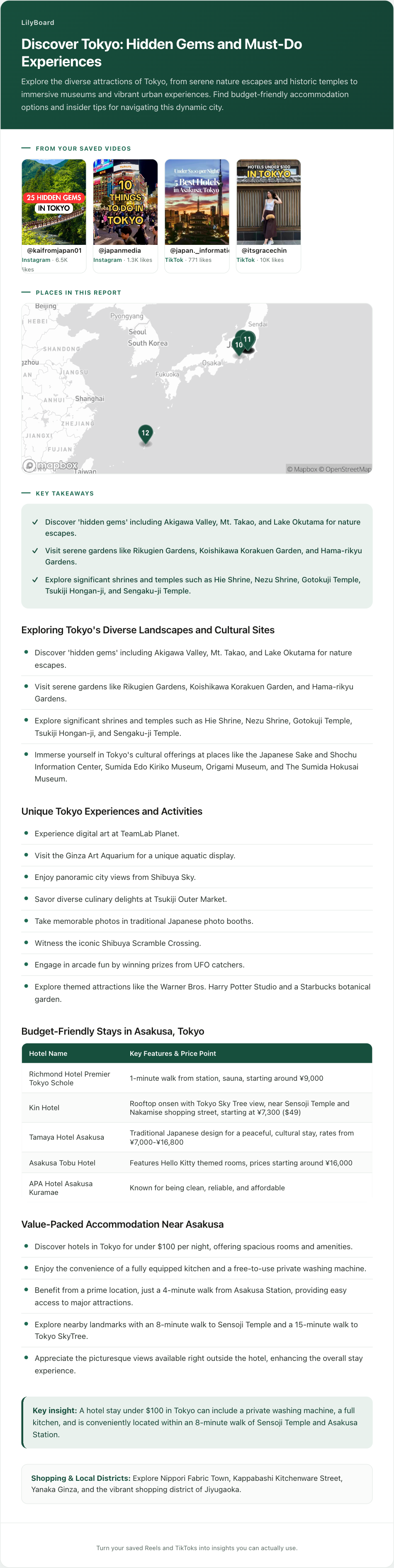
Each one is under a minute. If you tried to capture every place manually you'd be pausing, screenshotting, mistyping names, and probably losing half of them. The output above gives you every spot as text, pinned on one map, with the tips from each video, ready to search before your next trip.
That's the difference between "I saved some videos about Tokyo" and "I have every spot in one place, on a map, that I can actually search."
A few tips once you start
- Be specific with categories. "Cooking" is too broad. "Weeknight dinners," "Sunday meal prep," "Christmas baking" all give you better recall when you're looking for something specific. LilyBoard auto-categorizes broadly, so for anything that specific, make a collection and name it that.
- Save with a purpose, not by reflex. Before you tap save, ask: am I saving this because I'll do something with it, or because I liked it? "Liked it" goes in Likes. "Doing something with it" goes in your archive.
- Audit once a month. Open your archive, scan for anything you haven't referenced in 30 days, and delete. The point of an organization system isn't to keep everything. It's to keep the things that earn their spot.
- Always keep the source. No matter what tool you use, save the original TikTok link with each entry. When you need to double-check a step or rewatch a technique, you want the source one tap away.
TL;DR
The TikTok saved folder isn't broken, it's just not an organization system. To actually find your saved TikToks again, you need three things it doesn't give you: search inside the videos, categories that match how you'll use them, and the original link kept attached.
TikTok Collections help a little. A notes app helps more if you keep up with the typing. The lowest-friction option is to forward each TikTok to a tool that does the transcription and categorization for you. Try LilyBoard free (10 videos/month, no card). DM any TikTok to @lilyboardco on TikTok and get it saved as a searchable, categorized entry in minutes.
Your saved folder will stop being a graveyard. The cleaning hack, the book list, the marathon plan: all of it, findable in 5 seconds.
Try it on your own saved videos
Free for 10 videos/month. No card required. Send any Reel or TikTok to @lilyboardco and get a summary, transcript, and category in minutes.
Start for free